
Check if your plan allows crypto
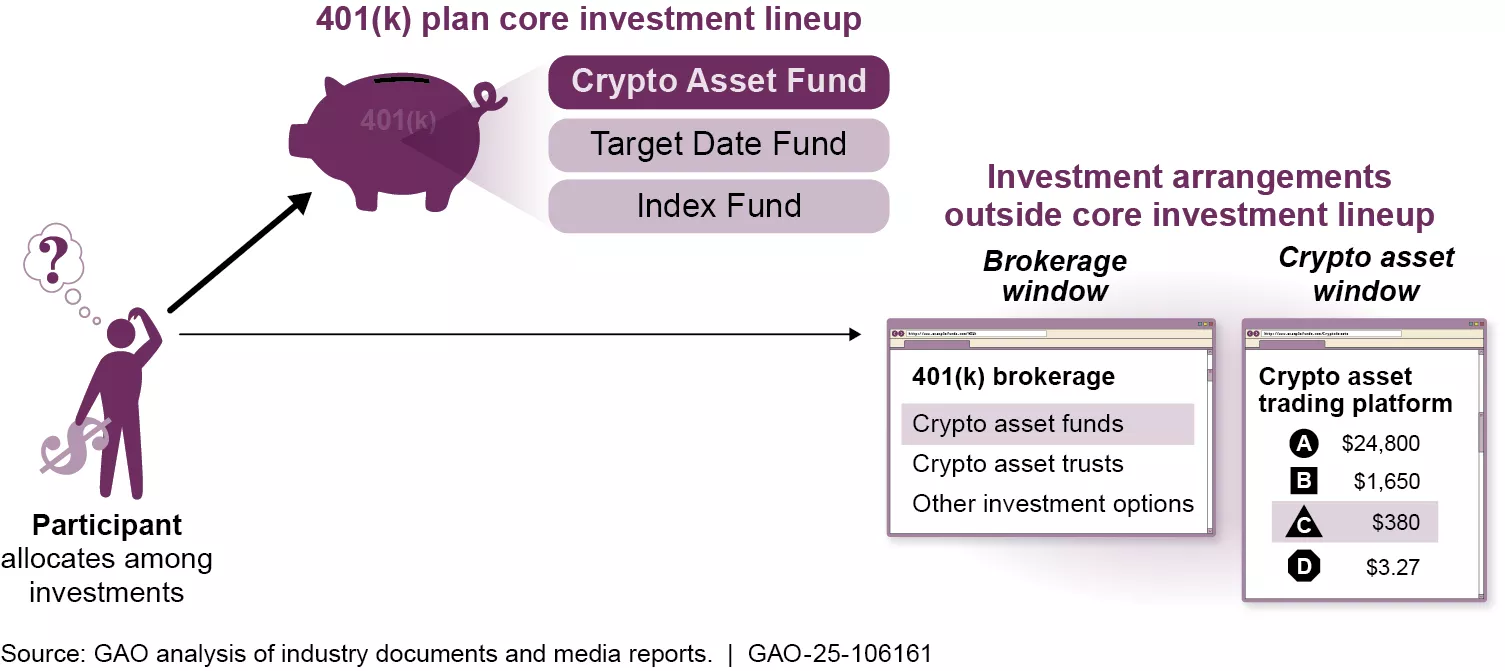
The first step in adding cryptocurrency to your 401(k) is verifying whether your current employer-sponsored plan already includes digital asset options. Most standard 401(k) plans do not offer crypto. You usually need a self-directed option or a specific provider like Fidelity's new digital asset window.
While recent regulatory proposals from the Department of Labor aim to make it easier for plans to include alternative assets like cryptocurrency, widespread adoption is still limited. Since 2022, some retirement plans have begun offering crypto investment options, but these are typically available through self-directed brokerage windows rather than as standard default choices. This distinction is critical: you cannot simply buy Bitcoin through a traditional 401(k) menu unless your employer has explicitly added it.
To determine your eligibility, review your plan's Summary Plan Description (SPD) or log in to your provider's portal. Look for sections labeled "Alternative Investments," "Self-Directed Brokerage," or "Digital Assets." If these options are absent, your current plan likely does not support cryptocurrency investments. In such cases, you may need to wait for your employer to update the plan or consider a self-directed IRA where crypto options are more common.
Choose a self-directed 401(k) provider
Adding cryptocurrency to a retirement account requires a custodian that explicitly permits digital assets. Traditional giants like Fidelity and Vanguard have begun offering crypto exposure, but they typically limit access to regulated funds or ETFs rather than direct coin ownership. To hold Bitcoin or Ethereum directly within your 401(k), you generally need a self-directed provider that treats crypto as an allowable investment option.
The landscape splits into two distinct categories. Traditional providers offer stability and integration with existing employer plans but often restrict direct crypto holdings. Specialist self-directed providers focus entirely on alternative assets, offering direct ownership of digital coins but requiring more administrative overhead and higher fees.

When comparing providers, focus on three critical factors: supported cryptocurrencies, fee structure, and setup requirements. Direct crypto ownership usually involves trading fees and annual custodial fees. Some providers charge a flat annual fee, while others take a percentage of assets under management. Ensure the provider supports the specific coins you intend to hold, as not all self-directed plans offer the same range of digital assets.
| Provider | Type | Crypto Access | Fee Structure | Minimum |
|---|---|---|---|---|
| Fidelity | Traditional | Crypto ETFs & Funds | Plan-dependent | None |
| Vanguard | Traditional | Limited ETFs | Plan-dependent | Varies |
| ForUsAll | Self-Directed | Direct Bitcoin & Ethereum | 0.15% trading fee, no setup | None |
| iTrustCapital | Self-Directed | Direct 40+ Cryptos | $25 trade fee, 1% AUM | $2,000 |
| Bitwise | Self-Directed | Bitwise 10 Index Fund | Plan-dependent | Varies |
Specialist providers like ForUsAll and iTrustCapital allow direct ownership of digital assets, meaning you control the private keys or hold them in a segregated custodial wallet. This approach offers greater transparency and potential upside but comes with higher volatility and regulatory scrutiny. Traditional providers like Fidelity and Vanguard offer indirect exposure through regulated funds, which simplifies compliance but limits your ability to withdraw or transfer the assets outside the plan. Before selecting a provider, verify their regulatory standing. The Department of Labor has issued guidance on crypto investments in retirement plans, emphasizing fiduciary responsibility. Ensure your provider is registered with the SEC or FINRA and has a clear compliance framework for digital assets. This step protects your retirement savings from potential regulatory actions or custodial failures.
Rollover or open a new self-directed account
Adding crypto to your 401(k) requires moving funds into a Self-Directed 401(k) (SD 401(k)) that permits digital assets. This structure gives you control over investment choices that standard plans typically exclude. The process involves verifying eligibility, selecting a custodian, and funding the account through a direct rollover or new contributions.
Most employer-sponsored 401(k) plans do not allow cryptocurrency investments. You must confirm whether your current plan permits alternative assets or if you need to roll over to a Self-Directed 401(k). If you are self-employed or a business owner, you can establish a Solo 401(k) that supports crypto. For employees, check your plan document or speak with your HR department to see if a rollover option exists.

Not all retirement account providers allow digital assets. Select a custodian or administrator that explicitly supports Self-Directed 401(k) plans with crypto holdings. Verify their fee structure, as SD 401(k) accounts often carry higher administrative costs than standard plans. Ensure the custodian provides secure storage solutions and clear reporting for tax purposes.
If you are rolling over funds from an existing 401(k), request a direct trustee-to-trustee transfer to avoid tax withholding and penalties. If you are opening a new Solo 401(k), complete the custodian’s application and designate the account type as Self-Directed. Provide your most recent tax return or employer identification number as required.
Once the account is established, transfer your funds or make new contributions. Ensure you stay within IRS annual contribution limits for 401(k) plans. For 2026, these limits may change, so verify current caps before funding. The custodian will hold the cash until you direct them to purchase specific crypto assets.
Direct your custodian to purchase approved cryptocurrencies, such as Bitcoin or Ethereum. The custodian will execute the trade on your behalf and hold the assets in a secure wallet. Keep records of all transactions for tax reporting, as crypto trades in retirement accounts are still subject to capital gains rules upon distribution.
Fund the account with digital assets
Funding a crypto 401(k) requires navigating a restricted menu of approved assets. Unlike a self-directed IRA, you cannot buy any token on any exchange. Instead, your plan sponsor or recordkeeper dictates which cryptocurrencies are available, typically limiting options to major assets like Bitcoin or Ethereum, or crypto-focused exchange-traded funds (ETFs).
Before executing a trade, verify the specific coins supported by your provider. Fees vary significantly; some platforms charge a flat monthly fee for crypto access, while others apply a trading percentage. Ensure you understand the cost structure before allocating funds.
-
Verify supported coins (e.g., BTC, ETH, or specific ETFs)
-
Check trading fees and monthly account maintenance costs
-
Confirm tax implications for your specific account type (Traditional vs. Roth)
Step 1: Select your crypto investment vehicle
Decide between direct cryptocurrency ownership and crypto-backed ETFs. Direct ownership involves buying the actual digital asset, which is often available through specialized 401(k) providers like ForUsAll that allow access to a broader range of tokens with low trading fees. Alternatively, crypto ETFs offer exposure to digital asset price movements through traditional stock market mechanisms, often with lower volatility and easier integration into existing brokerage interfaces.
Review your plan’s investment menu. If your provider partners with a specialized crypto platform, you may select individual coins. If not, look for spot Bitcoin or Ethereum ETFs listed in the standard mutual fund section. This choice determines how your asset is held and taxed.
Step 2: Execute the trade through your plan’s portal
Log in to your 401(k) provider’s website or mobile app. Navigate to the "Investments" or "Trade" section. Locate the cryptocurrency or ETF option you selected. Enter the dollar amount or percentage of your contribution you wish to allocate. Confirm the trade details, including any applicable fees, and submit the order.
Most platforms execute trades during market hours. Direct crypto trades may settle instantly or within a day, while ETF trades follow standard stock market settlement times (T+1). Keep a record of the transaction confirmation for your tax records.
Step 3: Monitor and rebalance
Crypto assets are highly volatile. Set a schedule to review your allocation. If your crypto holdings grow significantly, they may exceed your target risk percentage. Rebalance by selling a portion of the crypto and moving funds into more stable assets like index funds to maintain your desired risk profile.
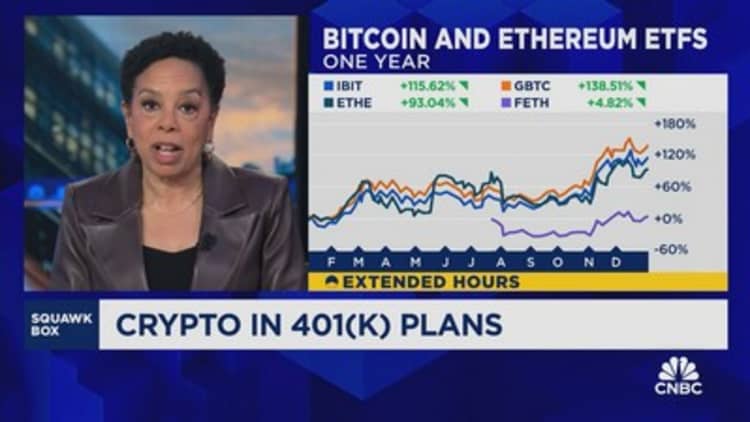
Volatility can quickly skew your portfolio. A 20% drop in crypto value might force you to sell other assets to maintain balance, or conversely, a surge might make crypto a disproportionate part of your retirement savings. Regular checks prevent unintended risk exposure.
Step 4: Document for tax reporting
Even within a tax-advantaged 401(k), keeping records of your crypto transactions is essential. While you won’t pay taxes on trades inside the account, you will need the cost basis and fair market value at the time of withdrawal to calculate taxes on distributions. Ensure your provider’s statements clearly show the purchase price and date for each crypto transaction.

Save all trade confirmations and annual statements. When you eventually take a distribution, the IRS requires you to report the taxable amount. Accurate records ensure you pay the correct tax on the growth of your crypto investments.
No comments yet. Be the first to share your thoughts!